



- The nbn® works without a traditional phone line.
- Home phones use VoIP. You'll need a provider offering a home phone service, with your handset connected to the modem's phone port.
- nbn® home phones won't work during a blackout, so keep a charged mobile phone handy
You don't need a traditional phone line to use the nbn®. You can get internet without a phone line, but if you still want a home phone, there's no reason to give it up.
An nbn® home phone generally uses your internet connection to make calls rather than the old copper telephone network. In most cases, you can keep your handset and existing number, although you'll need a compatible modem and a provider that offers home phone services.
Here's how to connect your nbn® landline phone, check it's working, keep your number and understand what happens during a blackout.
- Do you need a phone line for the nbn®?
- How to connect your home phone to the nbn®
- How to check if your phone line is active
- FTTN and FTTC upgrades to full fibre
- Keep your home phone number on the nbn®
- Home phone on Fixed Wireless and Satellite
- nbn® home phones in a power blackout
- Your questions answered
- References

Do you need a phone line for the nbn®?
No. If you're wondering do you need a phone line for nbn, the answer is that your internet and home phone are separate services. You can sign up for an nbn® plan without paying for a landline or owning a handset.
Only 12% of Australian adults used a landline in 2025 (ACMA 2026a). But a home phone can still be useful if:
- You have an older relative who prefers a familiar handset.
- You run a home business and want to keep an established phone number.
- Mobile reception is unreliable where you live.
- You've had the same number for years and don't want to change it.
nbn® home phone plans generally use Voice over Internet Protocol (VoIP), which carries calls over your broadband connection. Providers may charge per call or offer call packs with included calls to Australian landlines and mobiles.
If you rarely use a home phone, an internet-only plan could save you money. Otherwise, compare internet and phone bundles to see which providers offer both services.
How to connect your home phone to the nbn®
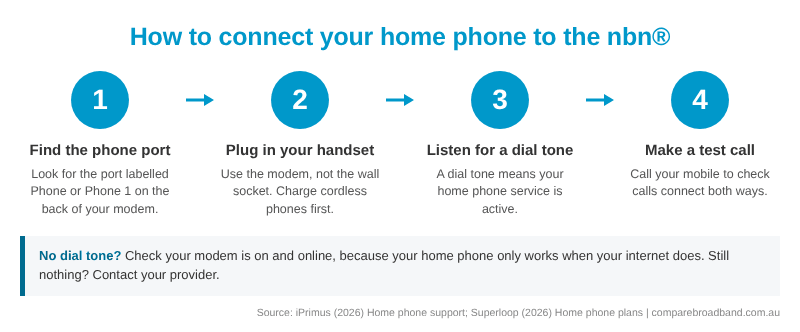
Connecting an nbn® home phone is usually straightforward. Your handset typically plugs into a phone port on your modem, although the setup depends on your connection type and provider.
You'll generally need:
- An active nbn® connection that supports your provider's voice service.
- A home phone or VoIP service activated by your provider.
- A compatible modem or telephone adapter with a phone port.
- Look for a port labelled Phone, Phone 1, TEL or TEL1 on your modem (iPrimus 2026b; Superloop 2026a).
| Connection type | Where your phone plugs in | What you need |
|---|---|---|
| FTTP, FTTN, FTTB and FTTC | Phone port on your modem | A modem with VoIP built in |
| HFC | Phone port on your modem | A modem with VoIP built in |
| Fixed Wireless and Satellite | Phone port on your modem, if your provider offers a home phone | A modem with VoIP built in, or a separate landline where available |
If you have FTTN or FTTC, your modem or nbn® connection box may still use an existing telephone wall socket for internet access. However, your home phone handset generally connects to the modem rather than directly to the wall.
No phone port? Ask your provider whether you need a compatible modem or VoIP adapter before buying anything. Our guide to cheap nbn® modems covers your options.
Most standard corded and cordless handsets can work with a compatible service, but older equipment may not be supported. Once connected, wait for your modem to register the phone service and make a test call.
How to check if your phone line is active
Pick up your handset and listen for a dial tone. If you hear one, make a call to your mobile, then call your home phone from your mobile to check incoming calls.
If your nbn® phone isn't working:
- Check your internet connection. Your home phone generally needs your modem and connection to be working.
- Check the cables. Make sure the handset is plugged into the correct phone port.
- Restart your modem. Allow a few minutes for the phone service to reconnect.
- Check your account. Having nbn® internet doesn't automatically mean you have an active home phone service.
- Contact your provider. Ask them to confirm your phone service is activated and registered.
If your internet is down too, check for nbn® outages in your area.
Moving house? An old telephone socket doesn't mean there's an active service. You'll need to arrange your connection through a provider. Our guide to setting up internet at your new home explains the process.
FTTN and FTTC upgrades to full fibre
NBN Co is progressively upgrading eligible FTTN and FTTC connections to Fibre to the Premises (FTTP).
Under its separate Targeted Upgrade program, selected households are expected to receive notifications from July 2027. Suspension of legacy copper services isn't expected before January 2028 and would be a last resort. These dates don't apply to every FTTN or FTTC property.
More than 99% of approximately 600,000 premises remaining in the FTTN upgrade program are expected to have access to full fibre by December 2030 (NBN Co 2026c).
You can generally keep your nbn® home phone after upgrading, provided your provider supports it. Ask whether you'll need new equipment and confirm your number will transfer before the upgrade.
You can also check your free FTTP upgrade eligibility.
Keep your home phone number on the nbn®
You can usually keep your existing landline number when moving to the nbn® or changing providers. This is called number porting, and it means you won't have to tell everyone you've changed numbers.
Before switching, there are a few things to know (ACMA 2026b):
- Don't cancel your old service first. Your number generally needs to remain active for a standard transfer.
- Check your new provider accepts number transfers. Local numbers beginning with 02, 03, 07 and 08 can usually be ported, but not every request is accepted.
- Check geographic restrictions. Moving to a different calling area may affect whether you can keep your number.
- Allow enough time. A straightforward local number port generally takes 8 to 15 days, while complex transfers can take up to 30 days.
Your new provider will need your full 10-digit number and account details. Make sure everything matches your existing account to avoid delays.
Some providers charge porting fees, and outstanding contract charges may apply. Ask about these costs before switching.
Most importantly, don't cancel your existing service until your new provider confirms the number transfer is complete. Test incoming and outgoing calls before closing the old account.
Our guide to switching nbn® providers explains the rest.
Home phone on Fixed Wireless and Satellite
Some providers offer VoIP home phones over nbn® Fixed Wireless or satellite connections. Availability varies, so check whether your provider supports voice calls on your connection.
Outside the fixed-line nbn® network, Telstra has obligations to provide access to standard telephone services under Australia's universal service arrangements. Its existing Universal Service Obligation contract runs until 2032, although this doesn't guarantee a traditional copper landline at every address (Department of Communications and the Arts 2018).
If you live in a regional or remote area, confirm what services are available before disconnecting an existing landline.
nbn® home phones in a power blackout
Unlike some traditional copper landlines, an nbn® home phone generally won't work during a power blackout unless the necessary equipment has backup power.
Your modem and other connection equipment need electricity. If they switch off, you may lose the ability to make calls, including to Triple Zero (000) (NBN Co 2026a).
Some FTTP installations support battery backup, but this doesn't guarantee your phone will work throughout an outage. Batteries have limited running times, and the wider network must also remain operational.
To prepare:
- Keep a charged mobile and power bank handy, particularly during storm season.
- Check medical alarms and monitoring devices for nbn® compatibility and battery or mobile network backup (NBN Co 2026b).
- Ask about Priority Assistance if someone in your household has a diagnosed life-threatening medical condition.
- Check your backup equipment. A suitable battery backup may keep certain devices running temporarily.
- Write down important numbers somewhere accessible without electricity or internet.
- NBN Co closed its Medical Alarm Register on 30 June 2023. If you use a medical alarm, speak directly with the supplier about compatibility and backup arrangements (NBN Co 2026b).
It's also worth distinguishing between a blackout and an internet outage. Some providers offer 4G backup on nbn® plans, but check whether this supports home phone calls as well as internet access.
Setting up a home phone for an older relative? Our seniors internet plans page can help you compare options.
If you're choosing between internet-only and nbn® with home phone, look at the total monthly cost, included calls and equipment requirements rather than the headline price alone.
When you're ready, check which plans are available at your address. Comparing is free. Prices are the same as going direct to the provider, with no mark-ups or additional fees.
Your questions answered
Can I use my old home phone on the nbn®?
Usually, yes. Most standard handsets work with a compatible modem or telephone adapter, although some older equipment may not be supported. Cordless phones need mains power, and even corded phones generally won't work during a blackout without power to the modem.
Does the old phone socket work on the nbn®?
Your handset generally connects to your modem rather than the wall socket. However, FTTN and FTTC connections may still use an existing telephone socket to deliver internet access. Some homes can also have their internal phone wiring professionally configured for VoIP.
Do I need a special modem for an nbn® home phone?
You'll need a compatible modem with a phone port and VoIP functionality, or a supported telephone adapter. Many provider-supplied modems include these features. Check compatibility before purchasing equipment (Aussie Broadband 2026a).
Can I get a home phone without internet?
An nbn® home phone generally uses an internet-based voice connection, but some providers offer voice-only services without a conventional broadband plan. Outside the fixed-line nbn® network, standard telephone services may also be available under universal service arrangements (Department of Communications and the Arts 2018).
How long does it take to keep my number when I switch?
A straightforward local number port generally takes 8 to 15 days, while complex transfers can take up to 30 days. Arrange the transfer before cancelling your existing service (ACMA 2026b).
Does it cost anything to compare with Compare Broadband?
No. Comparing is free. You pay the same price as going direct to the provider, with no mark-ups or additional fees.
 |
Hayley Griffin Content Lead Hayley draws on over ten years of experience in technology, internet, and communications fields. Her experience spans across global clients, offering expertise on about the nbn, internet plans and hardware challenges facing Australian households, businesses and consumers. Read full bio |
References
- ACMA (2026a) 'Mobile phone internet use soars as landline use keeps falling, ACMA research shows', Australian Communications and Media Authority.
- ACMA (2026b) 'Keep or port your phone number', Australian Communications and Media Authority.
- Aussie Broadband (2026a) 'Home phone on the nbn®', Aussie Broadband.
- Department of Communications and the Arts (2018) 'Universal Service Guarantee fact sheet', Australian Government.
- Department of Infrastructure (2026) 'NBN frequently asked questions', Department of Infrastructure, Transport, Regional Development, Communications, Sport and the Arts.
- iPrimus (2026b) 'Home phone support', iPrimus.
- NBN Co (2026a) 'Do you rely on your landline for communication?', NBN Co.
- NBN Co (2026b) 'Medical alarms and the nbn® network', NBN Co.
- NBN Co (2026c) 'More Australian homes and businesses to benefit from full-fibre upgrades', 3 September 2026, NBN Co.
- Superloop (2026a) 'Home phone plans', Superloop.
 Loading...