nbn® network outages are unavoidable. Most of the time, they don't last very long and are quickly resolved. But either way, getting disconnected suddenly can be a major inconvenience.
If you experience an outage, it's important to find out what caused it so that you can take the correct steps to resolve it. There are two common causes of nbn® outages: planned maintenance and unplanned technical issues.
Planned maintenance happens when your service provider performs upgrades or repairs on their network. In most cases, your nbn® Network service provider will give you advance notice of planned maintenance and provide an estimated time frame for when your connection should be restored.
When it comes to unplanned outages, they are usually caused by faults on the nbn® network or in your area. This means that something has gone wrong either with the nbn® Co's infrastructure itself or with one of the service providers' equipment.
If you are experiencing difficulties with your nbn® connection, it's important to check for network outages first to determine whether the problem is related to the nbn® or something else. You can do this by checking the nbn® Outage Map or contacting your internet service provider.
ACCC Measuring nbn® Broadband Speed (June 2023 report)
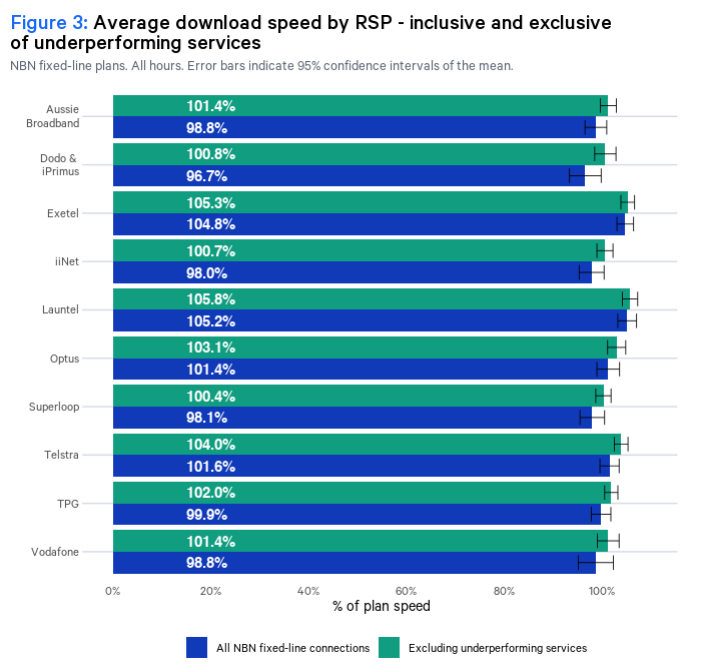
On 21 June 2023, the ACCC released its nineteenth performance report for the Measuring Broadband Australia program. The results are as follows.
Average download speed by nbn® provider
Busiest hour average download speed by nbn® provider
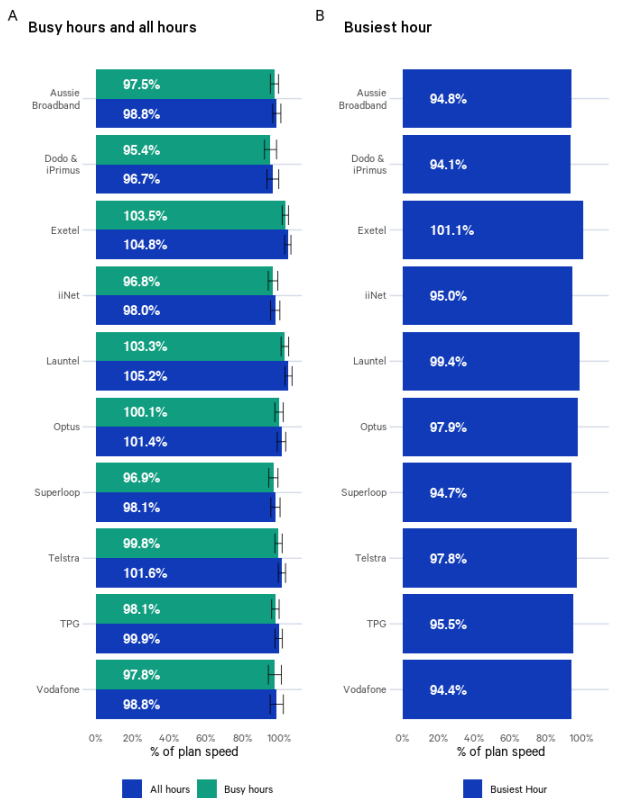
The August 2022 measurement period consisted of 31 days with four busy hours each, yielding an overall total of 124 hectic hours. However, the busiest hour download speed results in Figure 2 are lower than those calculated for Figure 1 - not what we hoped to see.
The Figure 2 results for network performance revealed that periods of high demand had an impact as the speed range spanned from 86.2% to 100.5% of plan speed - a greater spread than that displayed in Figure 1's metrics covering all hours and busy hours. Some RSPs were affected more strongly by peak usage times than others, though most still managed to maintain speeds above 90% of their original plans during those same times which matches up with earlier reports on this subject matter.
Average download speed by nbn® plan and technology
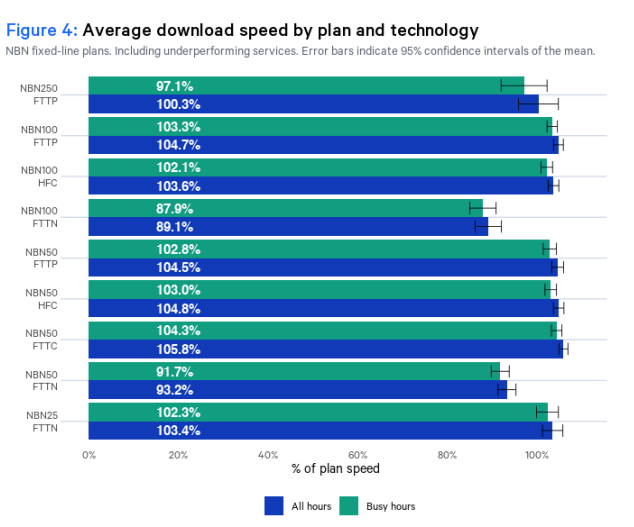
The type of nbn® connection you have in your area greatly affects the maximum speed you can get from your nbn® plan. In the chart below, we can see how each nbn® speed tier performs according to the type of technology used.
Within the nbn®50 plan, FTTN services had an average download speed of around 6 Mbps lower than other technologies - a difference of 12%. Within the nbn®100 plans, FTTN services had an average download speed around 14 Mbps lower than other technologies.
Advertised speeds and average download speeds by RSP
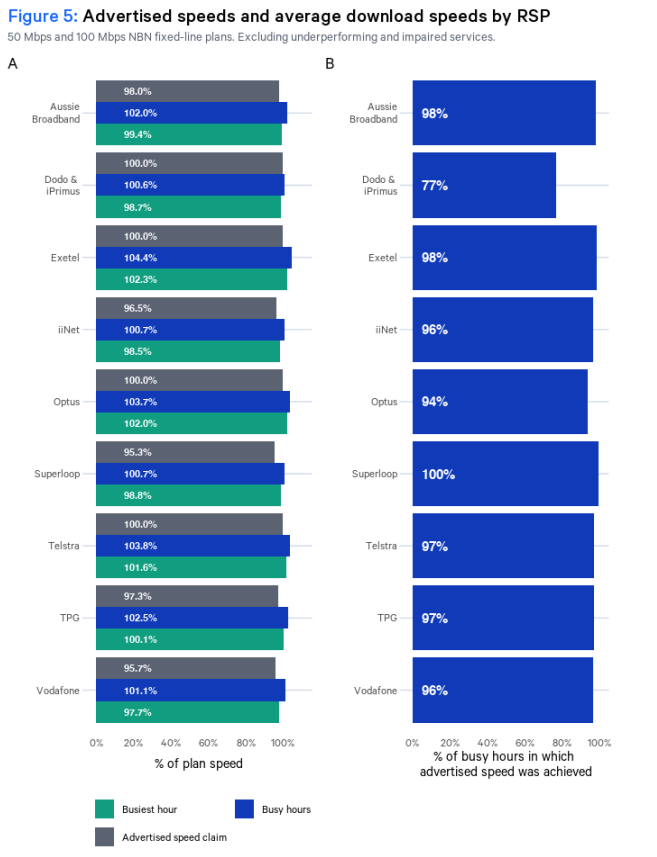
During the measurement period, RSPs promised download speeds ranging from 90 to 100% of the maximum plan speed for nbn®50 and nbn®100 products. Figure 8 illustrates a breakdown of typical evening hour speeds advertised by RSPs throughout this period, as well as how individual providers performed in terms of the busy hour and busiest hour download performance when compared against their nominal 50 Mbps and 100 Mbps, download speed claims, respectively.
These results show that had all underperforming services and impaired services been remediated, or moved to a more appropriate plan, the average download speeds of most RSPs would have met or exceeded their advertised speeds during their busy hours.
Outage characteristics by RSP
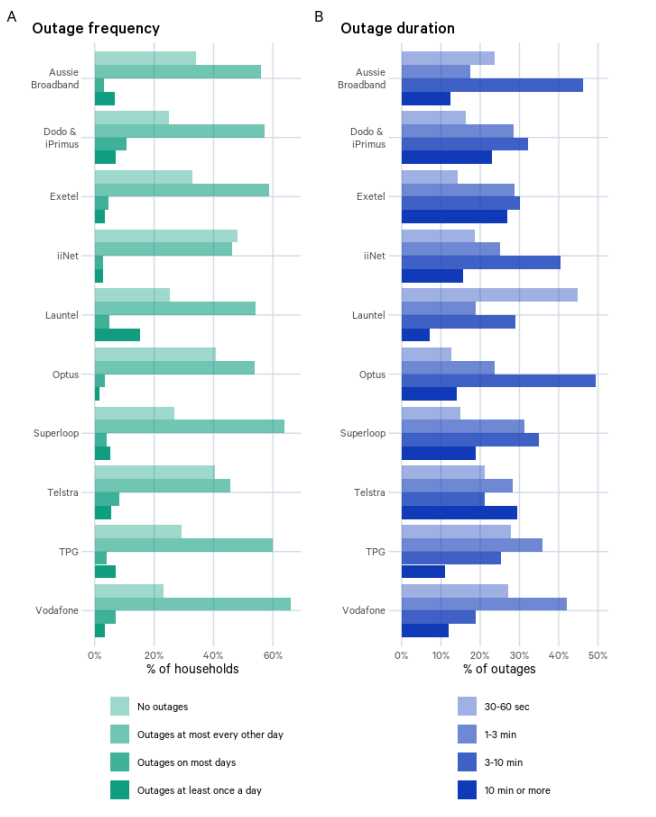
Graph above shows the distribution of outage rates and the distribution of outage durations for each RSP. These metrics indicate respectively how often outages occurred and the severity of outages’ impact on user experience.
Outage characteristics by access 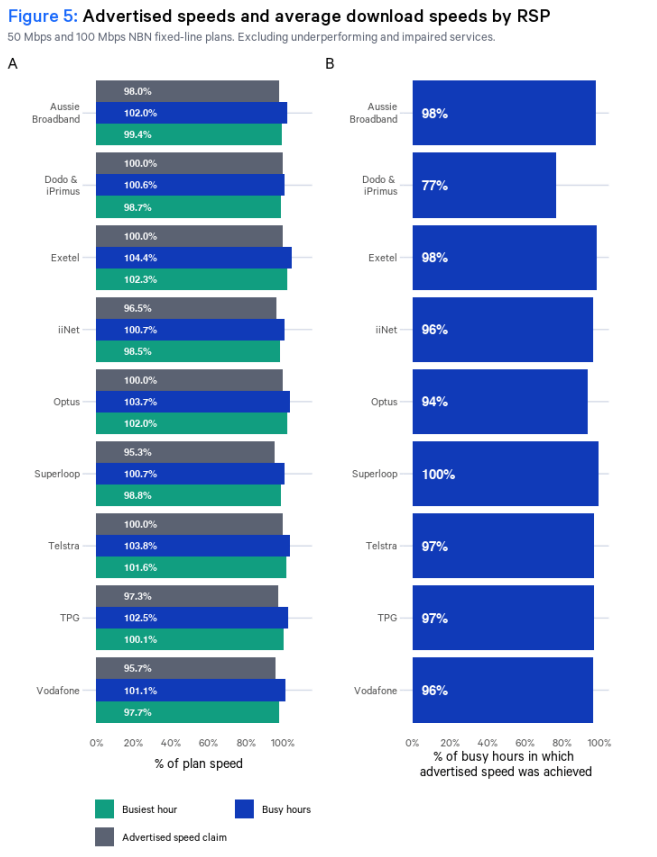 technology
Graph above shows the distribution of outage rates and the distribution of outage durations for different access technologies
How to check for nbn® network outages
There are a few ways to check whether there is an nbn® outage in your area.
Go to nbn® Co. website
The National Broadband Network has an outage map on its website, which covers premises connected to the nbn®. By entering your address, you can check whether there is an outage in your area and how long it may last.
Contact your nbn® network service provider
If the nbn® Network Outage Map does not indicate any issues in your local area and you're still experiencing issues, it's best to contact your internet service provider for more information about any potential outages affecting your connection.
This may involve getting in touch with their technical support team, who can investigate any known network outages in your area. We also recommend checking their website, as most major nbn® network providers have a dedicated network status page.
Where to report nbn® network outages by provider
To make it easier for you, we have compiled the direct links to network status checkers for the following nbn® network service providers below.
For system outages, you can contact Aussie Broadband via:
- 1300 880 905 (8am until midnight)
- You can lodge a fault 24/7 on the MyAussie app
Belong Network Outage
To find out if planned maintenance or an outage is affecting your nbn®™ service, you can:
- Download the Belong App on the Apple Store or Google Play Store and check via 'My services'.
- Login to your Belong account and visit the 'My services' page on our website.
- You should see your internet plan's network status and alert you for any known outages in the area.
Dodo Network Outage
To check for Dodo nbn® network status:
- Go to Dodo's Network Status Information page on their website.
- Hover your mouse over the map and click on your address.
- You should find legends indicating whether an outage or network degradation is happening in your area.
- If you cannot see any reported outages in your area, you can contact their support here: 13 dodo (13 36 36).
Exetel Network Outage
To check for Exetel Network Outages:
- Go to the Exetel Network Status Information page on their website.
- Navigate your mouse over the map and click on your address.
- You should find legends indicating whether an outage or network degradation is happening in your area. It is categorised as Unplanned, Planned/Upcoming, and Planned/Ongoing.
- You should also find a table that outlines the outages for Business nbn® (Corporate) and home internet networks (Residential).
- If you cannot see any reported outages in your area, you can contact their support here: 13 39 38.
iiNet Network Outage
To check for iiNet nbn® Network Outages:
- Go to the iiNet Network Status Information page on their website.
- Enter your postcode or full address and hit enter.
- You should find legends indicating whether there's an outage in your area's internet network.
- If your area is affected by an outage, we recommend you check this page every few hours for updates.
- If you cannot see any reported outages in your area, you can contact their support here: 13 22 58.
To check for More Telecom Outages:
- Go to the More Telecom Network Status Information page on their website.
- Use their interactive map and search for your address. Check the current Network Status for any planned or unplanned outages in your area.
- You should find legends indicating the type of internet network interruption (outage or degradation).
- You should also find a table that outlines the service experiencing issues, the type of outage, and the location affected.
- If you cannot see any reported outages in your area, you can contact their support here: 1800 211 112.
Optus Network Outage
To check for Optus nbn® Network Outages:
- Head to the Check Network Status page on their website.
- Search a street address on their interactive map to check your nbn® Network status.
- You should find reports to see any planned or unplanned outages in your area.
- If you cannot see any reported outages in your area, you can contact their support here: 133 937.
Superloop nbn® Network Outages
To check for Superloop nbn® Network Outages:
- Login to Superloop's Member's Area.
- The Member's Area login page will show any disruptions, whether planned or unplanned. Click "view more" to get more information on a particular disruption.
- If you cannot see any reported outages, you can contact their support here.
To check for Tangerine nbn® Network Outages:
- Head to the Check Network Status page on their website.
- Put your street address on their interactive map to check your nbn® Network status.
- You should find reports to see any planned or unplanned outages in your area.
- You should find legends indicating the type of internet network interruption (outage or degradation).
- You should also find a table that outlines the service experiencing issues, the type of outage, and the location affected.
- If you cannot see any reported outages, contact their support here: 1800 211 112.
Telstra nbn® Network Outages
To check for Telstra nbn® Network Outages:
- Go to the Check Network Status page on their website.
- Enter the street address on their interactive map to check your nbn® Network status.
- You should find reports to see any planned or unplanned outages in your area.
- If you cannot see any reported outages, contact their support here: 13 22 00.
TPG nbn® Network Outages
To check for TPG nbn® Network Outages:
- Go to TPG's Service Status page.
- You should see all the incident reports for any reported outages in your area.
- If you cannot see any reported outages, contact their support here: 1300 997 271 (for nbn®).
Uniti nbn® Network Outages
To check for Uniti nbn® Network Outages:
- You can call their customer support at 1300 847 201.
- You can email their customer service team at [email protected].
Most common causes of nbn® outages
nbn® outages occur for a variety of reasons. The duration will also vary depending on the cause of the outage.
These are some of the most common causes of nbn® outages:
Nature-related events
Calamities and disasters are the leading causes of these outages. Storms, strong winds, fire, and other natural events are all possible culprits behind the loss of your internet connection and it’s usually because they are very unpredictable.
They may cause damage to the cables and signal poles, leading to the loss of connection in your area. And if this happens, it may take a couple of days to get it repaired by maintenance teams.
The best thing you can do is to keep yourself updated with the latest weather forecast in your area. This way, you can prepare for any possibility of an outage and find an alternative method to get connected online, just in case.
You can also contact your nbn® service provider and ask about their contingency plan in case of an nbn® outage caused by weather-related events.
Equipment failure
For some households, the cause of their internet outage could be a malfunctioning modem or router damaged due to electricity spikes or power surges. Check if the modem is plugged in properly and if the router’s settings are configured correctly. You may also need to unplug them, wait for a few minutes, and plug it back in again.
Out-of-date tech
Do you remember the last time you had your hardware updated? Because if you don’t, chances are the outage you are experiencing is caused by out-of-date tech. If the problem is localised, this can be fixed with a simple hardware replacement. But for a widespread outage, it may take a little while to be resolved.
Improper installation
Another thing to check is whether your installation was done correctly. A component in your network may not have been set up correctly during the installation process. See if a cable is improperly plugged or if there are loose wirings in the hardware so you can secure them as necessary.
In some cases, you might have to contact technicians so they can check on the problem for you. But what’s good about it is that installation problems are easier to fix than damages caused by calamities.
Network congestion
A spotty internet connection does not necessarily mean there is a widespread outage in your area or household. It could simply be because too many people are connected to the internet at the same time. If this is a problem that you encounter often, you might want to consider upgrading your nbn® speed.
Since the National Broadband Network uses mixed technology in its infrastructure, the nbn® speeds you get may vary depending on the type of connection you have. This is why it’s important to discuss with your service provider what speed would be ideal for your needs.
Popular nbn® Plans
To find out more about how we recommend plans, take a look at how we work.
What to do to help you get through an nbn® outage?
Try restarting your modem/router
When you see that no further nbn® outage persists in your region after checking your telco's status page, this simply indicates that the problem is limited to you. But you don’t have to get on the phone with tech support just yet.
Try restarting your modem first. In some cases, an intermittent internet connection could be caused by a simple glitch in your device. Try turning it off for a couple of minutes and turning it back on in case your connection returns to normal speed.
If restarting your modem does not work, then it’s time to contact tech support.
Contact tech support
If you think you’ve tried everything you could to get the connection to return and still didn’t get results, your next best option is to contact your service provider’s tech support team. Doing so would be the quickest way to know what’s causing the problem and what needs to be done to fix it.
However, if there is a widespread outage, keep in mind that it may be difficult to get through the line considering the number of people trying to contact customer support services. But when you do manage to speak with one, explain your situation clearly so they can provide the necessary assistance.
Make do with mobile data
If all else fails, you might have to make do with mobile internet in the meantime. There are plenty of telcos that offer internet plans with a backup connection these days. Customers who avail of these plans are supplied with a modem that connects to a mobile network (usually 4G or 5G) so you can stay online in case an nbn® outage happens.
How long do nbn® outages last?
nbn® outages can last for a few minutes or a few hours, depending on the problem. A simple restart might do the trick if the problem is with your nbn® connection box or modem. However, if a wider network issue causes the outage, it might take a while to resolve.
If you want to stay updated on the latest nbn® outages, check their official website. It provides updates on current and future outages in your area so you can plan your internet usage accordingly.
Compare nbn® plans with Compare Broadband
nbn® outages are a true buzzkill. Whether you’re in the middle of submitting a report or bingeing on your favourite shows, losing internet connection is never welcome. But you should be fine with a reliable service provider and an internet plan that’s perfect for your location and consumption patterns.



























 Loading...